Tickets and client requests: every ask to a team in one place
Asks to a team usually arrive by email, in chat, in a shared spreadsheet and in a separate help-desk tool, and nobody sees the whole list. In Worknano they land in one menu entry, Requests. By default it is the Tickets module: every everyday ask to a team, from colleagues and from outside, becomes a ticket in that team's queue. Larger work for client companies can run next to it as Client requests, once that is enabled.
Tickets in team queues
A queue is a project of kind Queue, owned by a team. Each queue has five views: Board, List, Tasks (the work a ticket turned into), Forms (the forms that file tickets into this queue) and Unsorted (tickets without a queue, for Founders and Directors). A ticket moves through New, Open, Waiting on requester, Waiting on task and Resolved, with one step for each move: Take it, Ask the requester, Turn into task, Resolve and Reopen. Requesters inside the workspace get in-app notifications; requesters from outside get emails. Assigned tickets also appear under My → Tickets.
A form per queue
A form linked to a queue turns each answer into a ticket in that queue: the first answer becomes the title, all answers become the description, and the channel is set to Form. A form is either Public, open to anyone with the link at /public/forms/<name>, or Org members only, open to signed-in people of the workspace. A form created from a queue's Forms view needs only its questions.
Client requests for larger work
Client requests are optional. A Founder or Head turns them on in the Requests settings with Enable client requests, and the page appears next to Tickets. A client request is larger work for a client company: the client asks, the workspace plans it, the plan is approved and the work is done, in four stages: Request, Plan, Work and Done. A new request starts from a template with the headings Who needs this, Current situation, What we need, A useful first version, Priority and timing, and Examples. Clients see only their own company's requests, each with an Overview, a Plan tab, files, questions and one chat per request. The Requests settings also decide whether approval is required, whether the task is created when work starts, and whether new clients are saved to the CRM.
One assistant on both pages
The Requests Assistant works on Tickets and on Client requests. It answers what is waiting on the person asking and where a ticket or request stands, summarizes a queue or a request, and helps write replies and texts. It reads the records the person may see and does not change a status by itself.
Answers from the team's own documents
Many questions that reach a queue have been answered before, in a document somewhere. Worknano has no separate wiki: shared knowledge lives as documents in folders on the Docs page, next to tasks, deals and tickets. The Requests Assistant and the other page assistants search the whole workspace (records, folders, files and the text inside uploaded or written files) and read the matching document before they answer. When semantic search is enabled for the workspace (a workspace setting, off by default), they also find passages that describe the same topic in other words. They only find what the person asking may read.
Example: a colleague asks the assistant "How do refunds work?". It finds the refund policy in Docs, reads it and answers from it. The same assistant that answers the team inside the workspace also answers visitors on Worknano: on the home page and article pages, Nano (the "Questions? Ask me." button at the bottom right) answers in the visitor's language from the published Markdown articles, links the articles it used, and offers "Talk to the team", which opens the contact form. It has no access to workspace records. Outside people who need a team reach it through a Public form on its queue, where each answer becomes a ticket.
Help center, blog and FAQ
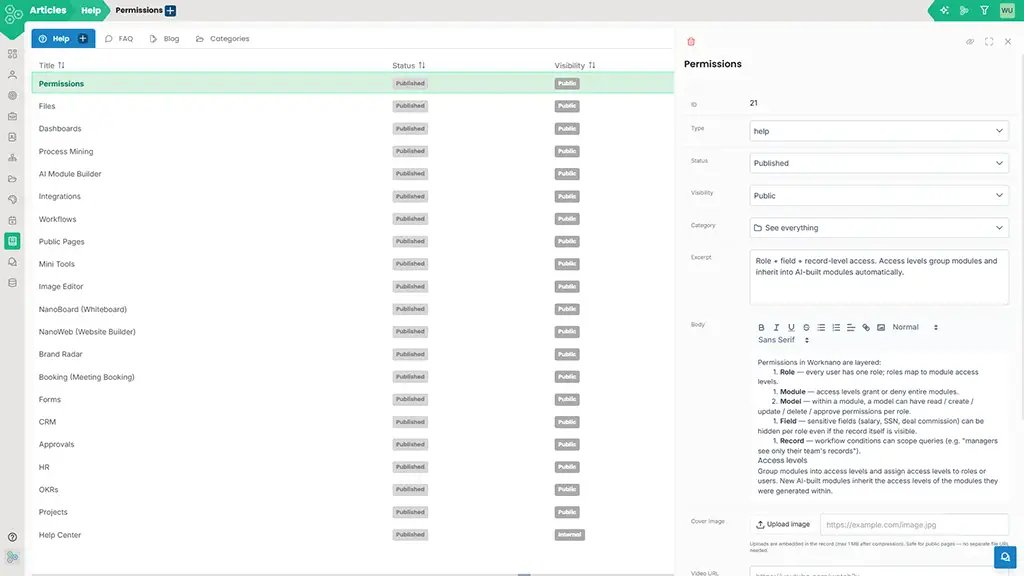
Most companies end up with a help center on one platform, a blog on another, a knowledge base on a third, and a product-tours tool on a fourth. Each has its own login, editor, search index and analytics. Worknano collapses all of that into one Articles module: every piece of long-form content lives in the same place, with a 'type' field deciding whether it shows up in the help center, the blog, the FAQ accordion or as an in-app tour.
Six article types, one editor
Help: task-shaped content for users solving a specific problem. FAQ: short Q and A surfaces, embeddable anywhere. Blog: magazine-grade posts with hero images and rich layout. KB: internal knowledge base, scoped to the workspace. Policy: company policies with version history and acknowledgement tracking. Tour: Shepherd-powered in-app product tours.
Publish to the right surface, automatically
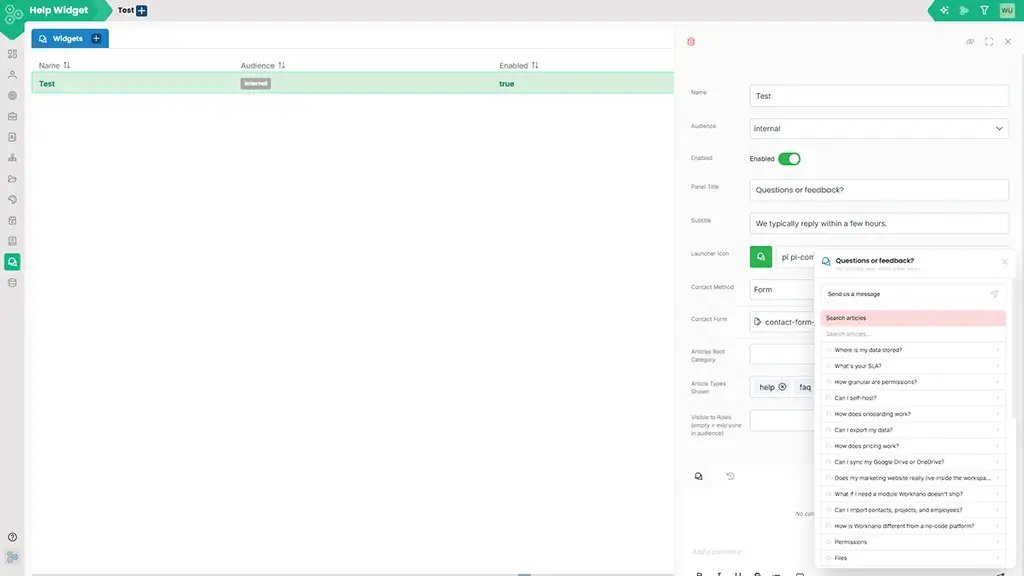
Set type and visibility; the article shows up where it belongs. A help article goes to /public/articles?type=help in your workspace. A blog post goes to the blog index and emits an RSS entry. A FAQ becomes available to embed via the [FAQ:slug] marker on any other page. An internal kb article is invisible to the public but searchable from the in-app help widget.
Editor that does not fight you
Rich text with code blocks, callouts, tables, embeddable forms, embeddable other articles, embedded screenshots from the screenshot library, and AI assists for tone, length and SEO. Drafts, scheduled publishing and version history are built in.
Search that works because the content is unified
Because help, blog, FAQ and kb live in the same table, search can rank across all of them. The in-app help widget surfaces the most relevant article regardless of type. Public visitors get the public surfaces; logged-in users get the broader index.